

Operations
Complaint Management
Complaints from forms, email or manual entry in one list; owners and SLAs are clear and root causes and resolutions stay on record.
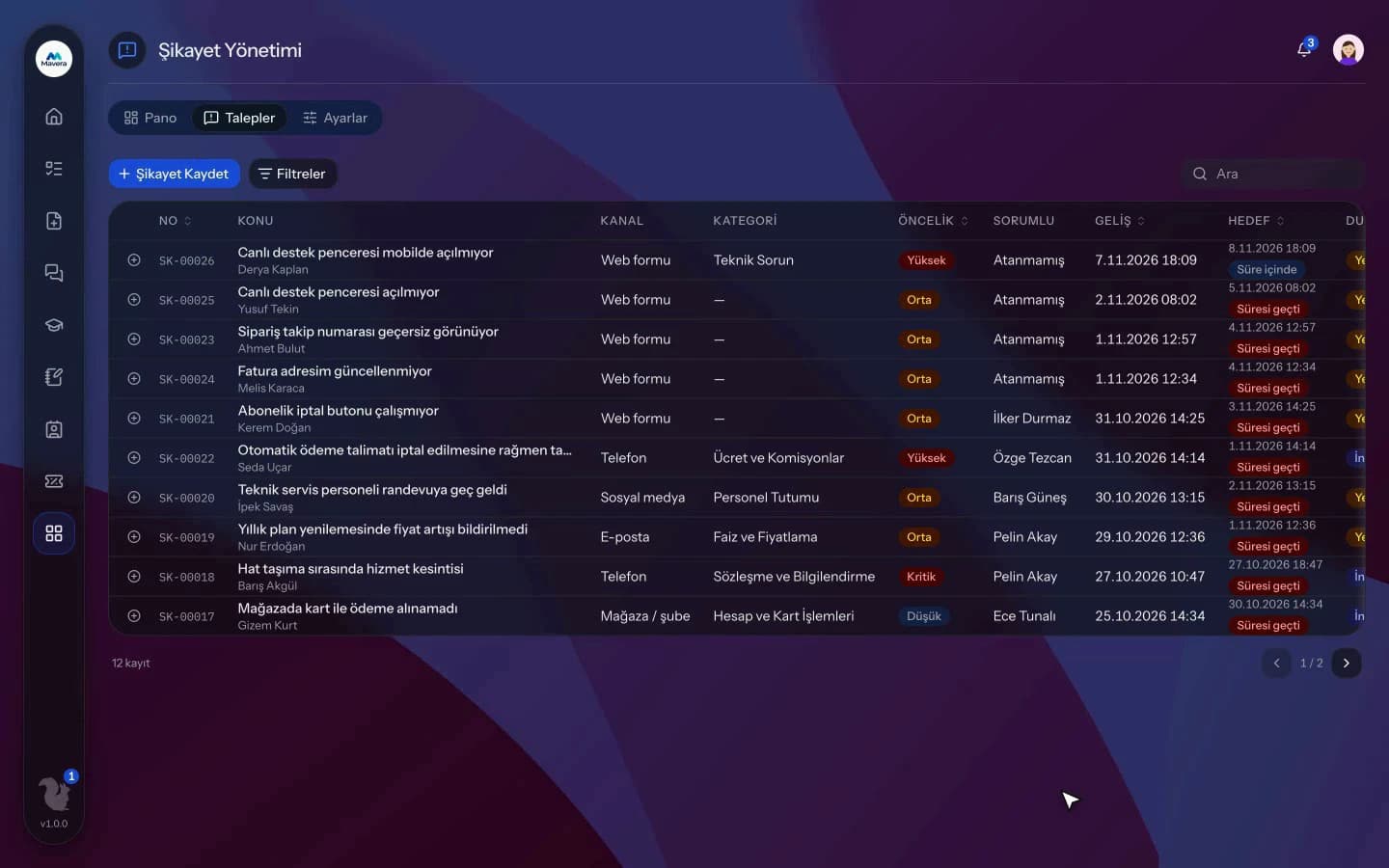
Complaint Management
How It Works
Receive the complaint
Complaints come in from the public form, a mailbox or manual entry.
Assign and investigate
Set the owner, priority and category; the SLA clock starts.
Resolve and close
Enter a resolution note and root cause; the record is resolved or closed.
Features
What You Can Do
- Keep complaints from phone, store, web and other channels in one list, tagged by channel.
- Design your own public complaint form; submitters get a tracking number.
- Connect a mailbox; incoming emails become complaints at regular intervals.
- Set separate SLA times per priority.
- Each record shows SLA status: on time, due soon or breached.
- Assign an owner, pick a root cause and write a resolution note.
- Internal notes, files and the full event history stay on the record.
- Resolved complaints can be reopened within a set period.
- Link complaints to contacts or companies in your customer records.
- The dashboard shows status, channel, category and monthly trend breakdowns.
Common Questions
When a mailbox is connected to Kolekto's Complaint Management module over IMAP, incoming emails are read every five minutes and turned into complaint records with email as the channel. The same message never creates a second record, and auto-replies and system messages are skipped.
In Kolekto's Complaint Management module, a separate SLA in hours is set for low, medium, high and critical priority (120, 72, 24 and 8 hours by default), and the target time is counted from when the complaint was received. When the remaining time drops to a quarter of the total (at least two hours), the record shows as "at risk", and once the time is up it shows as "overdue".
Yes. CRM holds companies and contacts, and you move deals along a drag-and-drop pipeline. Each stage shows its total amount per currency; won and lost deals stay on the board for a while. Tasks are assigned to people and listed on their home page. Documents can be attached to company and contact records.
Pending approvals, resolved requests and new assignments are delivered both in-app and by email. Employees track the stage of their request from their panel.
Each organization designs its own approval flows in Process Management: approval, task, notification and escalation steps are laid out per request type in the drag-and-drop designer, with no limit on the number of levels. Approvers are derived from the org chart: the reporting line, the department head, a title holder or a permission chain. If an approver is on leave, their delegate, their manager or a backup approver steps in; an overdue step is escalated by its SLA rule. Every step shows in the progress indicator and in the user activity log.
Start running your company from one place.
In the demo call we agree on your needs and the modules to enable.
Request a DemoContact Us